Separate stars from moving worlds
An optical star projector forms a sky through dedicated optical components. A digital fulldome system renders or plays imagery and sends it through one or more projection channels. A hybrid combines these approaches. None is automatically the correct answer for every private residence: the intended experience determines which compromises deserve attention.
If the priority is a contemplative night sky, ask to see star appearance, darkness and motion in a suitable demonstration. If the priority is travel through astronomical datasets, examine the digital rendering tools and the operator workflow. A hybrid can bring both capabilities into one room, but it also introduces coordination, alignment and maintenance responsibilities that should be understood from the outset.
Compare methods on the same terms
Do not compare an isolated projector specification with a complete installed system. The lens, screen, image processing, content and room conditions all influence the result. Request demonstrations using comparable material and ask which parts of the proposed configuration are actually represented. A showreel can reveal expressive range without proving the performance of your own dome.
| Approach | Useful focus | Coordination question |
|---|---|---|
| Optical stars | Dedicated sky presentation and astronomical motion | Where does the instrument sit, and what does it obstruct? |
| Digital fulldome | Rendered journeys, media playback and adaptable imagery | How are pixels distributed and calibrated across this dome? |
| Hybrid | Optical stars alongside digital scenes | How are the two image systems aligned and operated together? |
Understand mapping before counting pixels
Digital imagery must be transformed for the curved surface. A single-channel system may use a wide-angle lens; a multi-channel arrangement distributes the image across several projectors. In either case, geometry matters. Mapping compensates for the relationship between the lens and the dome so that intended shapes appear in the correct places.
With multiple channels, overlapping regions also need blending and colour coordination. The useful question is not merely how many pixels the projectors contain, but how the installed system distributes detail across the visible field. Ask about representative viewing positions, lens behaviour and calibration procedures. A total pixel count does not explain whether a particular constellation label will remain comfortable to read.
Protect darkness as carefully as brightness
Projected light can reflect from one part of a dome onto another. This cross-reflection, together with equipment black levels and stray room light, affects the perceived depth of a dark scene. Brighter is not automatically more convincing. The room and the image should be evaluated as an interacting light environment.
Surface reflectance, nearby finishes and essential lighting need coordinated decisions. Ask to view dim star fields as well as bright planetary sequences. A system may look compelling during a luminous demonstration yet reveal unwanted glow in quieter material. Record the conditions of any evaluation so that the discussion remains about an identifiable setup rather than an impression detached from context.
Bring content into the specification
A dome is not a universal player for every video file. Fulldome media commonly uses a dome-oriented image format, while interactive astronomy software generates views in real time. Compatibility, orientation, audio tracks and playback permissions need checking. A conventional film may require a deliberately framed presentation rather than an attempt to stretch it around the entire surface.
Content rights are a separate consideration from equipment ownership. Ask whether a title permits private residential playback and whether the licence has time limits, renewal conditions or restrictions on public events. Maintain a library record with format, source, version and licence information. This administrative layer helps prevent a technically capable room from becoming difficult to use.
Integration note: request a calibration and recovery record
Ask who performs geometric alignment, colour matching and blend adjustments; what triggers recalibration; and where the approved settings are backed up. Include a recovery procedure for a replaced projector or a reconfigured media server.
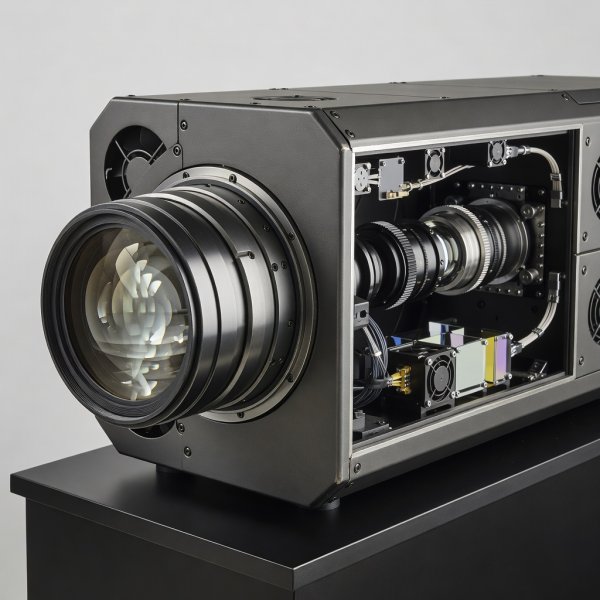
The lens is part of the system
Lens access, cooling and the path to the screen need coordination. Supporting equipment imagery should never replace a dimensioned installation drawing.
Commission an experience, not a power switch
Acceptance should include a useful variety of scenes: darkness, point-like stars, text, movement and bright imagery. Review them from multiple seats. Confirm that the system can start, pause, recover and shut down through the intended user interface. Record any remaining limits clearly, including content-specific issues that cannot be solved through calibration.
A demonstration is most useful when it generates a shared vocabulary between homeowner, designer and integrator. Keep sample material and agreed observations with the project records. The objective is a documented image chain whose behaviour is understood, not an unsupported promise that every possible scene will look equally impressive.